 Skolera LMS Blog Educational Technology Articles and News

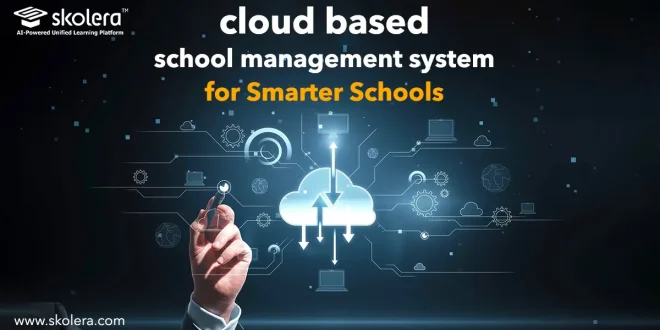
Educational institutions today are undergoing a rapid digital transformation that is reshaping the way daily operations are managed within schools. With the growing need to unify data and streamline processes, a cloud based school management system has become a practical option for managing both academic and administrative aspects through a unified digital platform. These systems help educational institutions reduce their reliance on disparate systems, improve access to information, and support users through a more flexible and efficient environment. Skolera’s documentation highlights its use of a unified platform that integrates learning management, content management, student affairs, and enterprise resource planning systems.
Table of Contents
What Is a Cloud Based School Management System?
A cloud based school management system is a digital system that enables schools to manage a range of academic and administrative processes. A cloud school management system consolidates data and core functions within a single environment. Its key features include:
- Unified platform: It brings together various academic and administrative functions in a single environment, helping the institution manage operations through an integrated system.
- Centralized data management: Enables the organization and access of information through a single platform, making it easier for authorized users to manage data.
- Role-based design: The system provides tools and permissions tailored to the responsibilities of each user, such as system administrators, faculty members, and students, helping to regulate access to system functions.
- Continuous Updates and Development: The platform continues to receive improvements and new features to support the needs of educational institutions and enhance the user experience.
Why Are Schools Moving to Cloud Based Management Systems?
The shift toward cloud based school management system
is driven by the need to reduce the complexity of operations resulting from the use of multiple platforms. A unified platform integrates the LMS, CMS, and ERP. Reasons for this Shift:
- Unification of systems and data: Consolidating functions and data into a single platform helps reduce the need to switch between multiple systems.
- Improved access to information: The system provides a unified environment through which authorized users can access the tools and data related to their responsibilities.
- Reduced workflow complexity: Integrating functions such as learning management, content management, student affairs, institutional resources, and reporting simplifies the handling of various processes.
- Support for expansion and continuous development: The platform’s capabilities allow for the addition of new enhancements and features.
read more about: Student Enrollment Management System for School Growth
What School Operations Can Be Managed in the Cloud?
A cloud based school management system can support a wide range of academic and administrative processes, depending on the modules and features available on the platform. A cloud-based education system helps provide a unified digital environment for managing student affairs, attendance, grades, and assessments.
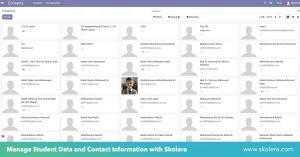
Student Information and Records
The software helps organize student information within a centralized environment, making it easier for authorized users to access and manage data according to their roles.
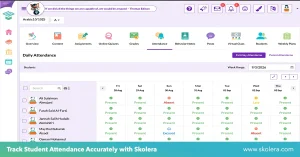
Attendance and Academic Management
The system supports attendance tracking, academic performance monitoring, and the management of grades and assessments through a single platform. Skolera provides tools for tracking attendance.
Fees and Financial Operations
It helps link financial operations with educational and administrative processes when ERP modules and financial integration are available. According to Skolera updates, the ERP upgrade included electronic fee payment via Kashier and synchronization of fees and invoices between the ERP and LMS, along with the ability to transfer students between departments.
Teacher and Staff Administration
The system can support the management of roles and permissions and provide different tools to users based on their responsibilities.
Parent and Student Communication
The system can facilitate communication between schools and users through messages, notifications, and digital collaboration spaces, depending on the available features.
read more about: Online Student Attendance Management System for Smarter Schools
Cloud Based vs On-Premise School Management Systems:
Understanding the difference between cloud-based and on-premises school management systems helps schools choose the model that best meets their needs. Key Comparison Factors:
| Comparison Factor | Cloud-Based Systems | On-Premises Systems |
| Hosting Location | The vendor hosts the platform on its own cloud infrastructure. | The system runs on infrastructure the institution manages itself, usually on-site. |
| Initial Infrastructure Requirements | Because the provider supplies the hosting environment, schools rarely need to invest in new hardware before going live. | Dedicated servers, networking equipment, and the staff time to set them up are typically needed before deployment can begin. |
| Maintenance Responsibility | Maintenance follows the provider’s own operating model, so most of the day-to-day burden sits with the vendor. | The school’s own staff, or a contracted third party, are responsible for keeping the system running and up to date. |
| Accessibility | The system can be reached over the internet from almost anywhere, subject to appropriate access controls. | Access generally depends on the institution’s internal network, which can make off-site use more difficult. |
| Updates | Updates roll out according to the provider’s schedule, often without requiring any action from the school. | Internal staff must plan, test, and deploy updates themselves, which can delay adoption of new features. |
| Scalability | Growth in users, branches, or administrative units is generally absorbed by the provider’s existing capacity and the school’s chosen plan. | Expanding to serve more users or locations usually calls for additional internal infrastructure and investment. |
| Backups | Backup and restoration procedures are governed by the provider’s own policies, which vary from one vendor to the next. | Backup and data restoration are handled entirely in-house, giving the school direct oversight of the process. |
| Business Continuity | Continuity in the event of disruption depends on the provider’s infrastructure, track record, and recovery procedures. | Continuity rests on what the institution has built itself: its infrastructure, backup strategy, and recovery planning. |
read more about: Private School Management Software for Modern Schools
How Does Cloud-Based Management Improve School Efficiency?
A cloud based school management system can improve operational efficiency by consolidating data and reducing the need to switch between different systems. Digital school management helps organize daily operations more efficiently. Efficiency benefits:
- Consolidation of processes and data: Bringing processes and data together on a single platform helps reduce the need to switch between different systems and improves coordination between academic and administrative functions.
- Reducing manual work: Digital features, bulk data import, and certain integration processes can reduce the need to perform certain tasks manually. Skolera’s updates, for example, support the bulk import of students, parents, and materials.
- Improved performance tracking: Course progress tracking tools and dashboards provide metrics related to attendance, grades, and other performance indicators, helping users track performance.
- Simplified reporting: The platform offers reporting and analytics capabilities that help institutions organize information, track performance, and use available data for decision-making.
read more about: Student Fee Management System for Efficient School Finance
How Secure Is Student Data in Cloud-Based School Systems?
Data security is a key consideration when choosing a cloud based school management system. Skolera’s updates outline the control and monitoring mechanisms, including role-based access controls and the logging of operations and activities performed. Key control mechanisms:
- Role-based permissions: Permissions tied to user roles help define the functions and data that each user group can access based on their responsibilities within the system.
- Activity logs: The platform logs a range of operations such as logins, content creation, grade adjustments, and report generation—along with the time and user identity.
- Activity monitoring: System logs help track and review operations performed within the system, supporting the identification of activities that require follow-up.
- Support for accountability: Recording operations with the date, time, and user identity provides a reference log that can be consulted when reviewing activities within the system.
read more about: Automation in Education Sector for Smarter Schools 2026
What Should Schools Consider Before Moving to a Cloud-Based System?
Before selecting a cloud-based school management system, schools should assess their needs, access methods, infrastructure, scalability, and system integration. Skolera provides a unified platform with LMS, CMS, SIS, ERP, reporting, and analytics. Considerations include:
Reducing dependence on on-premise infrastructure:
Cloud solutions can reduce reliance on internally managed infrastructure, depending on the hosting model and services provided.
Supporting access from different locations:
Ensure authorized users can access tools and data from locations according to their roles and permissions.
Making system updates easier:
Understand how updates, improvements, and new features are implemented within the provider’s operating model.
Scaling the system as the school grows:
Evaluate support for a growing number of users, units, and branches, including student transfers and bulk data imports supported by Skolera.
Centralized management for multiple campuses:
Ensure centralized management and data integration across departments or branches, including student transfers.
How Does Skolera Support Cloud-Based School Management?
Skolera supports cloud based school management systems through a unified platform combining educational and administrative functions, including LMS, CMS, student affairs, ERP, reporting, and analytics. Its role-based design gives each user group access to the appropriate tools. Skolera’s key features include:
- Attendance, Grades, and Assessments Management: The platform manages attendance, grades, and assessments while tracking course progress and academic metrics.
- Academic Planning and Content Sharing: It supports academic planning, resource sharing, and content management while helping users monitor courses and educational activities.
- Reporting and Analytics: The platform provides reports, dashboards, and analytics to help users monitor data and academic performance clearly.
- Integration of Educational and Administrative Processes: Skolera combines LMS, CMS, ERP, student affairs, reporting, and analytics in one environment, with ongoing improvements and new features.
FAQ:
Can schools access cloud-based management systems from anywhere?
Cloud-based management systems provide authorized users with online access to the platform, enabling administrators, teachers, and other users to access the tools and data they need according to their permissions.
How does cloud technology reduce school IT costs?
Cloud systems can help reduce reliance on certain on-premises infrastructure components, though the actual cost varies depending on the hosting model, pricing, and services selected by the educational institution.
How does a cloud-based system support school scalability?
Cloud-based systems help educational institutions expand the scope of the platform’s use by adding new users, units, or branches, depending on the system’s capabilities. Skolera’s updates demonstrate support for transferring students between departments or branches, as well as the bulk import of students, parents, course materials, and other data.